inkStar Logo

Payments That Handle Themselves

Payment links, Klarna installments, deposit collection, refund tracking, and revenue reports. All integrated with your appointments and powered by Mollie.

inkStar appointment payment link generation screen

Manual payment tracking is draining your business

Chasing payments, juggling apps, and reconciling spreadsheets takes hours every week. Meanwhile, customers who can't pay upfront simply book elsewhere.

  • Lost high-value bookings

    Customers who want a full sleeve or large piece walk away when they can't split the cost. No installment option means no booking.

    Revenue Loss
  • No-shows without deposits

    Without a deposit requirement, customers have nothing at stake. They cancel last minute or simply don't show up, and your time slot is wasted.

    Wasted Time
  • Payment tracking across multiple apps

    Cash in the register, card payments in one app, PayPal in another, bank transfers in your inbox. Reconciling everything at month-end is a nightmare.

    Admin Overhead
  • Chasing overdue payments manually

    Texting, calling, and following up on outstanding balances is awkward and time-consuming. It strains client relationships and feels unprofessional.

    Client Friction
  • No visibility into revenue

    Without consolidated payment data, you can't see which services generate the most revenue, which payment methods customers prefer, or where money is leaking.

    Blind Spot

One system for every payment

inkStar handles payment links, deposits, installments, refunds, reminders, and reporting. No more juggling apps or chasing payments.

  • Payment Links via Mollie

    Generate shareable payment links for any appointment or invoice

  • All Major Payment Methods

    Card, PayPal, bank transfer, Apple Pay, Google Pay, and cash

  • Klarna Installments

    Let customers split payments into 3, 6, or 12 monthly installments

  • Deposit & Downpayment Collection

    Collect deposits at booking, settle the remainder after the session

  • Automatic Payment Reminders

    SMS and email reminders for upcoming and overdue payments

  • Invoice Generation

    Auto-generated, branded invoices emailed to customers

  • Revenue Reports

    Revenue breakdown, payments by method, and timeline charts

  • Accounting Export

    Export-ready data for QuickBooks, Xero, and Excel

See every feature in action

From payment links to revenue reports, here's how inkStar handles every aspect of studio payments.

  1. Payment Links & Online Payments

    Generate a payment link for any appointment and share it with your customer via SMS, email, or messaging apps. Customers pay online using their preferred method through Mollie's secure checkout.

    • One-tap link generation from any appointment
    • Supports card, PayPal, Apple Pay, Google Pay, and bank transfer
    • Payment automatically matched to the appointment record
    inkStar payment link generation for an appointment
  2. Klarna Installments

    Offer your customers the option to pay in 3, 6, or 12 monthly installments through Mollie's native Klarna integration. You receive the full amount upfront while Klarna handles collection.

    • Customers choose their preferred installment plan at checkout
    • You get paid in full immediately, Klarna handles the rest
    • Makes high-value services accessible to more customers
    inkStar payment details showing installment options
  3. Deposits & Downpayments

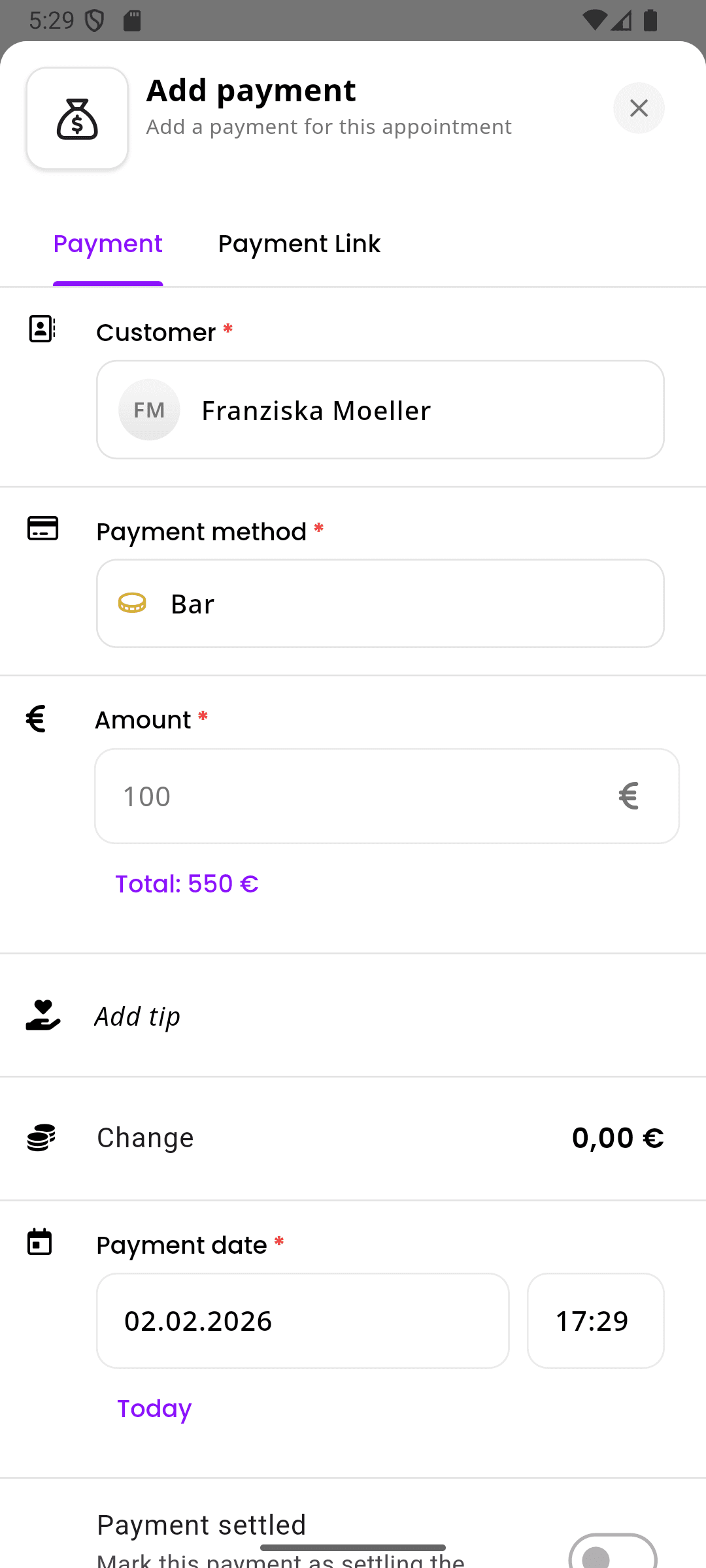
    Collect a deposit when the appointment is booked and settle the remaining balance after the session. Two-stage payments protect your time and reduce no-shows.

    • Set deposit amounts per service or as a percentage
    • Remaining balance tracked and payable via link or in person
    • Full payment history visible on each appointment
    inkStar cash payment recording for an appointment
  4. Refunds & Payment Tracking

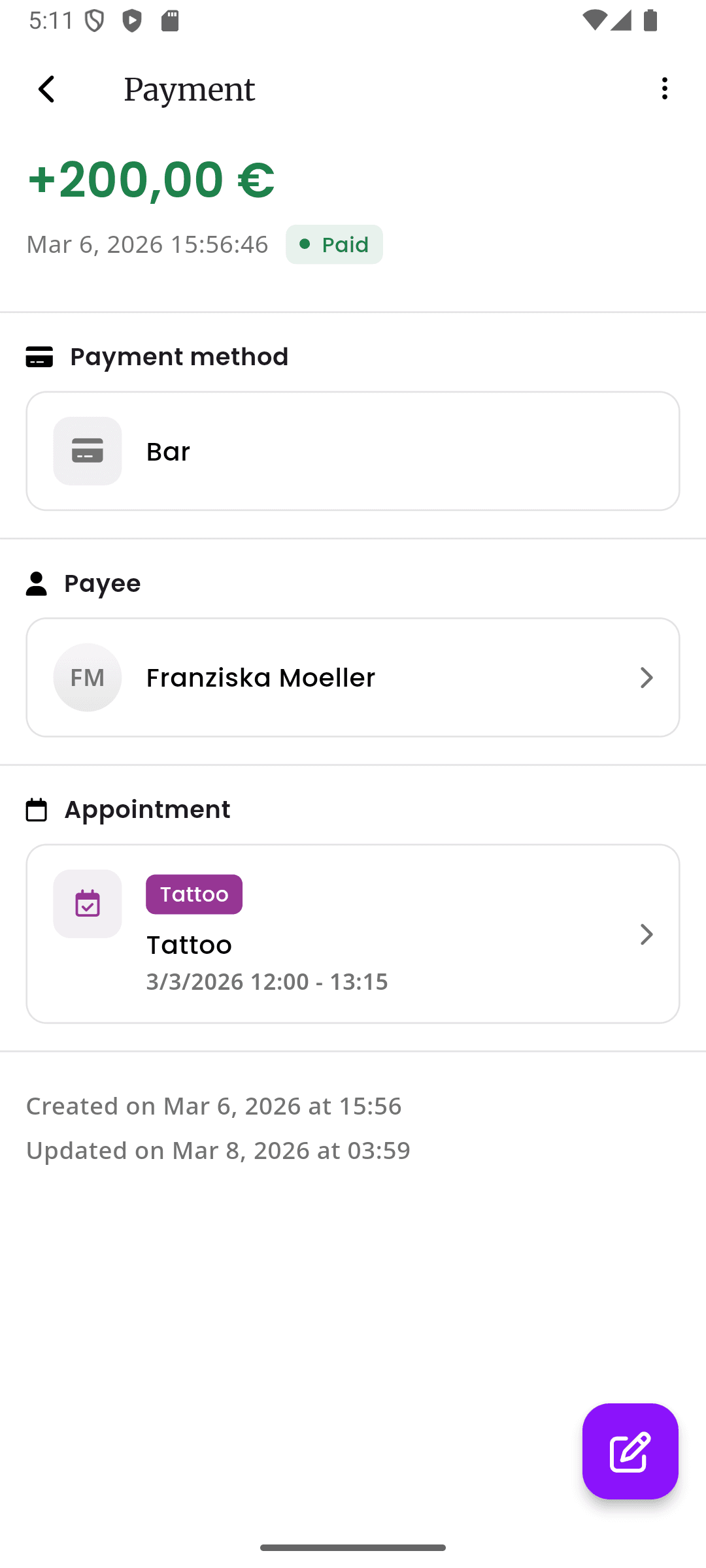
    Track the full lifecycle of every payment: pending, authorized, paid, declined, cancelled, expired, and refunded. Record refund amounts, dates, and reasons directly on the appointment.

    • Complete payment status tracking from creation to settlement
    • Refund amounts and reasons recorded for your records
    • Non-integrated payments (cash, external transfers) tracked alongside online payments
    inkStar payment details with status tracking and refund information
  5. Revenue Reports & Analytics

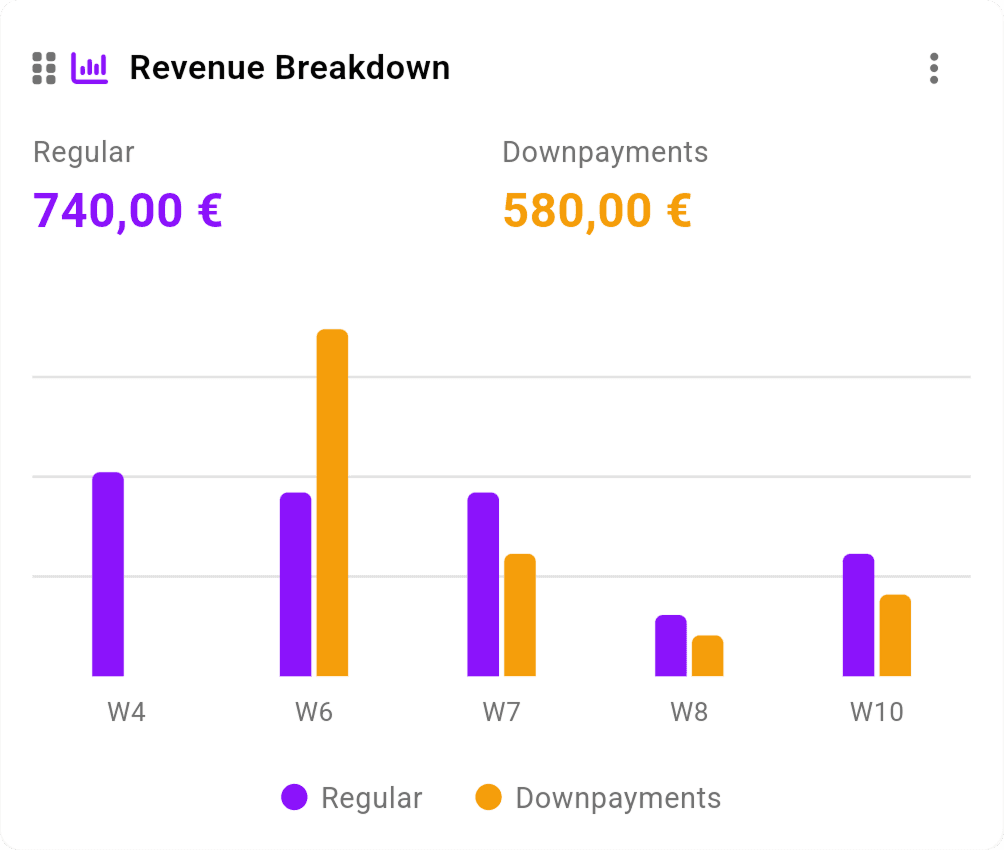
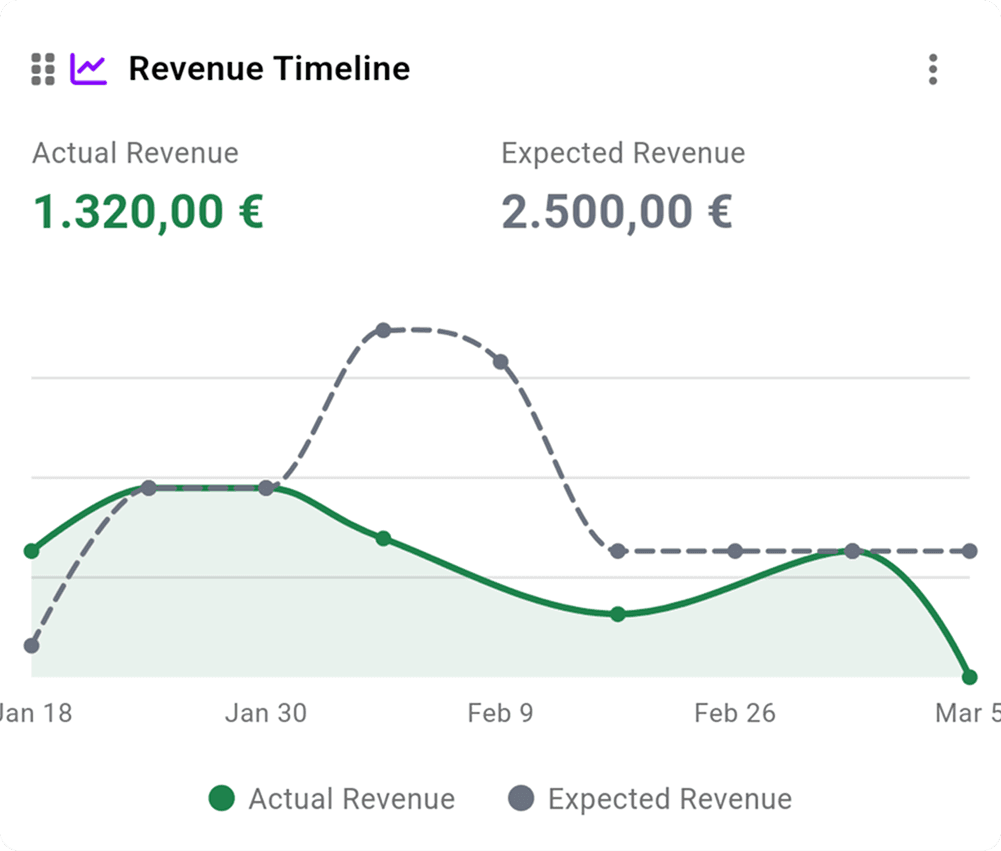
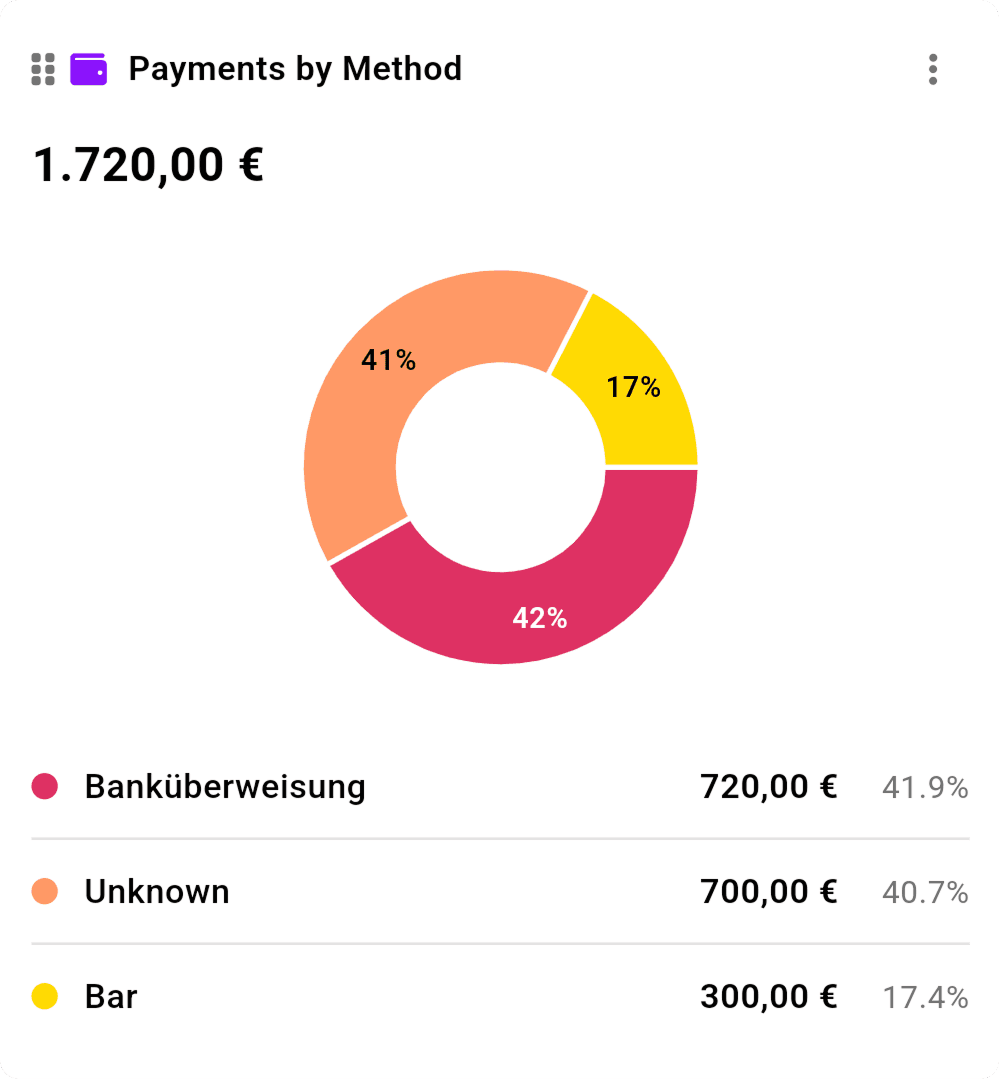
    See exactly where your money comes from with revenue breakdown charts, payments-by-method analysis, and revenue timeline views. Export everything for your accountant.

    • Revenue breakdown by service type and payment method
    • Timeline charts showing revenue trends over time
    • One-click export to QuickBooks, Xero, or Excel
    inkStar report dashboard showing revenue breakdown chart
    inkStar report dashboard showing revenue timeline over time
    inkStar report dashboard showing payments by method chart

Why inkStar beats the alternatives

Compare manual tracking, standalone payment apps, and inkStar's integrated approach.

  • Integrated with appointments

    Cash Only / Manual
    No connection
    Standalone Payment Apps
    Manual matching
    inkStar
    Auto-linked to each booking
  • Deposit collection

    Cash Only / Manual
    Cash in hand, hope they show
    Standalone Payment Apps
    Separate payment request
    inkStar
    Built into booking flow
  • Payment links

    Cash Only / Manual
    Not possible
    Standalone Payment Apps
    Yes, but not linked to booking
    inkStar
    Generated per appointment
  • Klarna installments

    Cash Only / Manual
    Not possible
    Standalone Payment Apps
    Requires separate Klarna setup
    inkStar
    Native via Mollie
  • Refund tracking

    Cash Only / Manual
    No records
    Standalone Payment Apps
    In payment app only
    inkStar
    On the appointment record
  • Payment status lifecycle

    Cash Only / Manual
    Paid or not paid
    Standalone Payment Apps
    Basic status
    inkStar
    Full lifecycle tracking
  • Revenue reports

    Cash Only / Manual
    Manual spreadsheets
    Standalone Payment Apps
    Payment data only
    inkStar
    Breakdown, timeline, by method
  • Multiple payment methods

    Cash Only / Manual
    Cash only
    Standalone Payment Apps
    Yes, per app
    inkStar
    All methods in one place
  • Auto-reconciliation

    Cash Only / Manual
    Everything manual
    Standalone Payment Apps
    Not connected to bookings
    inkStar
    Payments matched automatically
  • Customer payment portal

    Cash Only / Manual
    Not possible
    Standalone Payment Apps
    Generic payment page
    inkStar
    Branded portal with invoice history

Studios love getting paid easier

Hear from studio owners who simplified their payment workflow with inkStar.

  • Klarna installments unlocked bookings I was losing.

    Customers who wanted large pieces but couldn't pay upfront can now split into monthly payments. I get paid in full immediately through Mollie. It's been a game-changer for my bigger projects.

    Marcus Jensen
    Tattoo Studio Owner · Berlin
  • Deposits cut my no-shows dramatically.

    Before inkStar, no-shows were my biggest headache. Now I collect a deposit when they book, and they actually show up. The payment link makes it easy for them to pay before the appointment.

    Sophia Martinez
    PMU Artist · Barcelona
  • I stopped chasing payments entirely.

    Payment reminders go out automatically, customers pay through their link, and everything is already matched to the appointment. Month-end used to take hours, now I just export and send to my accountant.

    Priya Patel
    Tattoo Studio Owner · London

Answers to common questions

Everything you need to know about payments in inkStar.

Through Mollie, your customers can pay by credit/debit card (Visa, Mastercard, Amex), PayPal, bank transfer, Apple Pay, and Google Pay. You can also record cash and other offline payments manually so everything is tracked in one place.

When you generate a payment link, Klarna is available as a payment option through Mollie. Customers can choose to split their payment into 3, 6, or 12 monthly installments. You receive the full amount upfront (minus Klarna's fee), and Klarna handles collection from the customer.

Mollie charges per transaction with no monthly fees. Rates vary by payment method and region. Klarna installments have a separate fee structure. Check Mollie's official pricing page for up-to-date rates. inkStar itself charges no additional payment processing fees.

You can collect a deposit when an appointment is booked by generating a payment link for the deposit amount. The deposit is recorded on the appointment, and you can generate a second payment link for the remaining balance after the session. Both payments are tracked on the appointment record.

Refunds are processed through Mollie and tracked on the appointment record in inkStar. You can record the refund amount, date, and reason. For non-integrated payments like cash, you record the refund manually. All refund data is included in your revenue reports and accounting exports.

Yes. inkStar lets you record non-integrated payments like cash, external bank transfers, or payments through other apps. These are tracked on the appointment record just like online payments, so your reports and exports include all revenue regardless of payment method.

From any appointment, you can generate a payment link with one tap. Share it with your customer via SMS, email, WhatsApp, or any messaging app. The customer clicks the link, chooses their payment method on Mollie's secure checkout page, and pays. The payment is automatically matched to the appointment.

Create a Mollie account, complete their verification process, and connect it to inkStar in your studio settings. Once connected, you can generate payment links directly from appointments. Mollie handles all payment processing, security, and payouts to your bank account.

Still have questions?
Contact Support

Ready to Transform Your Studio?

Start your free trial today and see for yourself how inkStar simplifies your daily workflow.

What you get with your free trial:

  • Full access to all features for 7 days
  • Free data migration assistance
  • Personal onboarding session
  • Dedicated support team
  • 7-day free trial
  • Cancel anytime
  • GDPR compliant
  • Encrypted data at rest & in transit
inkStar

Everything Your Studio Needs

Built by studio owners, for studio owners

  • Works Offline
    Full functionality without internet. Syncs automatically when you're back online.
  • Digital Contracts
    Consent forms, signatures, and medical history. All paperless and legally sound.
  • Integrated Payments
    Card, PayPal, Klarna installments. Automatic deposit collection at booking.
  • Smart Scheduling
    Availability-based slot suggestions. Online booking page for your customers.
Artist Testimonial
inkStar transformed my chaotic studio into a professional business.
Maria Chen
Tattoo Artist, Berlin
Payments & Installments for Tattoo, PMU & Piercing Studios | inkStar