inkStar Logo

Collect Deposits at Booking. Stop No-Shows.

Collect deposits the moment clients book through your online booking page. Automatic reminders keep them accountable, and if they still don't show - you keep the deposit.

Collect deposits the moment clients book through your online booking page. Automatic reminders keep them accountable, and if they still don't show - you keep the deposit.

Every empty chair is money lost forever

Without deposits collected at booking time, you have zero leverage over clients who simply don't show up. No-shows cost the average studio thousands every month - and most owners don't even realize it.

How inkStar protects your schedule

Deposits collected at booking. Reminders on autopilot. Policies that enforce themselves. You just do your work.

  1. Client books online

    A client picks a service and time slot on your booking page - just like any normal booking.

  2. Deposit is collected instantly

    Before the booking is confirmed, the client pays the deposit. Cards, PayPal, or instant transfer - their choice.

  3. You're protected from day one

    Reminders go out automatically. If they cancel late or don't show, you keep the deposit. If they show up, it's applied to the bill.

  • Deposits at Booking

    Clients pay when they book through your page. No separate steps, no manual follow-up.

  • SMS, WhatsApp & Email Reminders

    Automatic reminders via SMS, WhatsApp and email at configurable intervals with one-tap confirmation links.

  • Cancellation Policies

    Set your window. Late cancellations forfeit the deposit automatically.

  • No-Show Tracking

    Every no-show is recorded with reliability scoring and repeat offender alerts.

inkStar appointment screen showing deposit collection and payment link
  • One-Tap Confirmation

    Clients confirm directly from the reminder. No calls, no back-and-forth.

  • Self-Service Rescheduling

    Clients reschedule instead of ghosting. They keep their deposit, you keep a full calendar.

  • Configurable Amounts

    Fixed amounts or percentages per service. More for premium, less for quick sessions.

  • Calendar Gap Recovery

    Waitlist clients are notified automatically when a slot opens up.

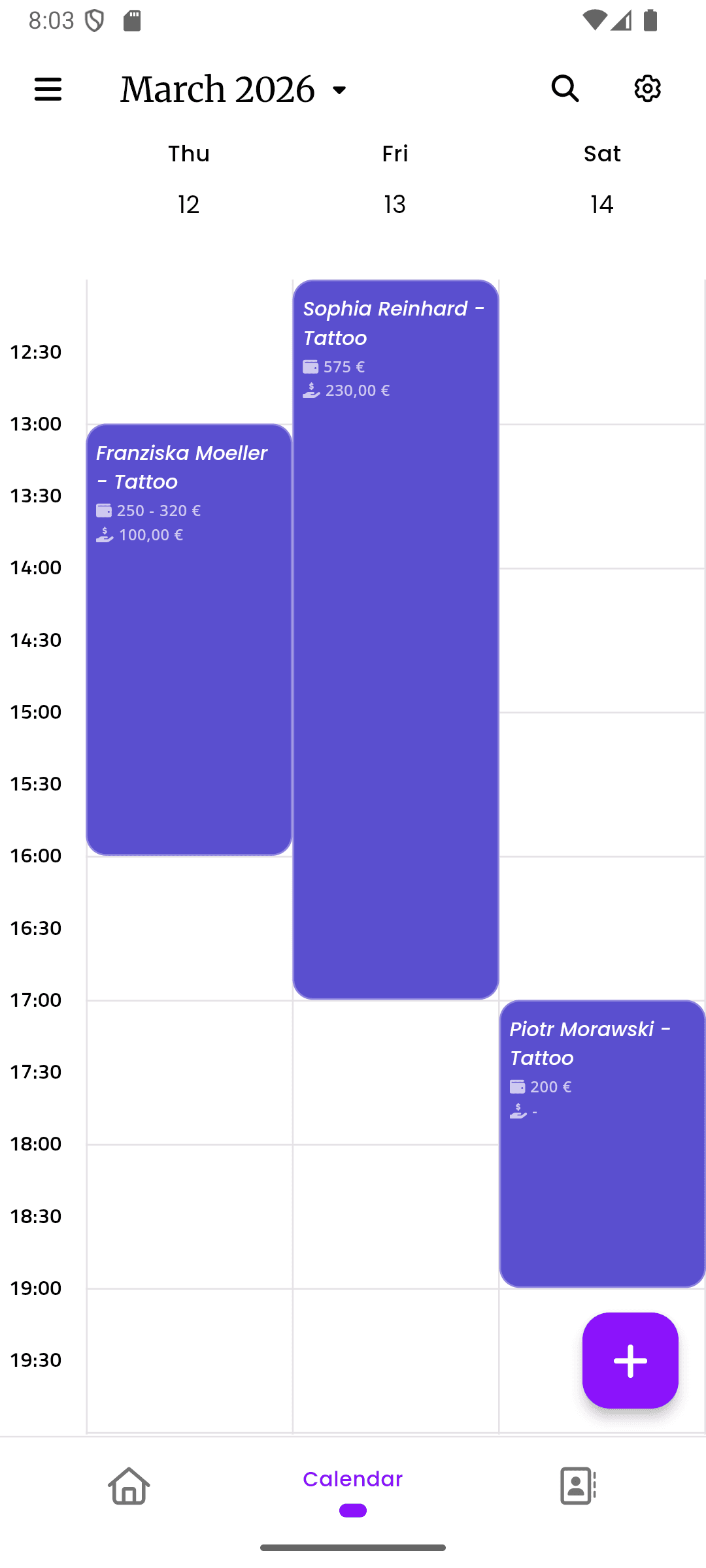
inkStar calendar view with appointment schedule and reminders

A closer look at every feature

From deposit collection to calendar gap recovery - here's exactly how each piece works to keep your schedule full.

  1. Deposits at Booking

    When a client books through your online page, they pay the deposit as part of the flow. No separate links, no follow-up. The booking is only confirmed after payment.

    • Fixed amounts or percentages per service
    • Cards, PayPal, and instant transfers
    • Deposit applied to the final bill automatically
    inkStar appointment screen showing deposit collection and payment link
  2. Automated Reminders

    SMS, WhatsApp and email reminders go out at intervals you choose. Every reminder includes a one-tap confirmation link and a reschedule option - making it easy to act, not ghost.

    • Configurable timing: 24h, 48h, 1 week before
    • One-tap confirmation and reschedule links
    • Alerts if no confirmation is received
    inkStar appointment details screen showing reminder and confirmation status
  3. Cancellation Policies

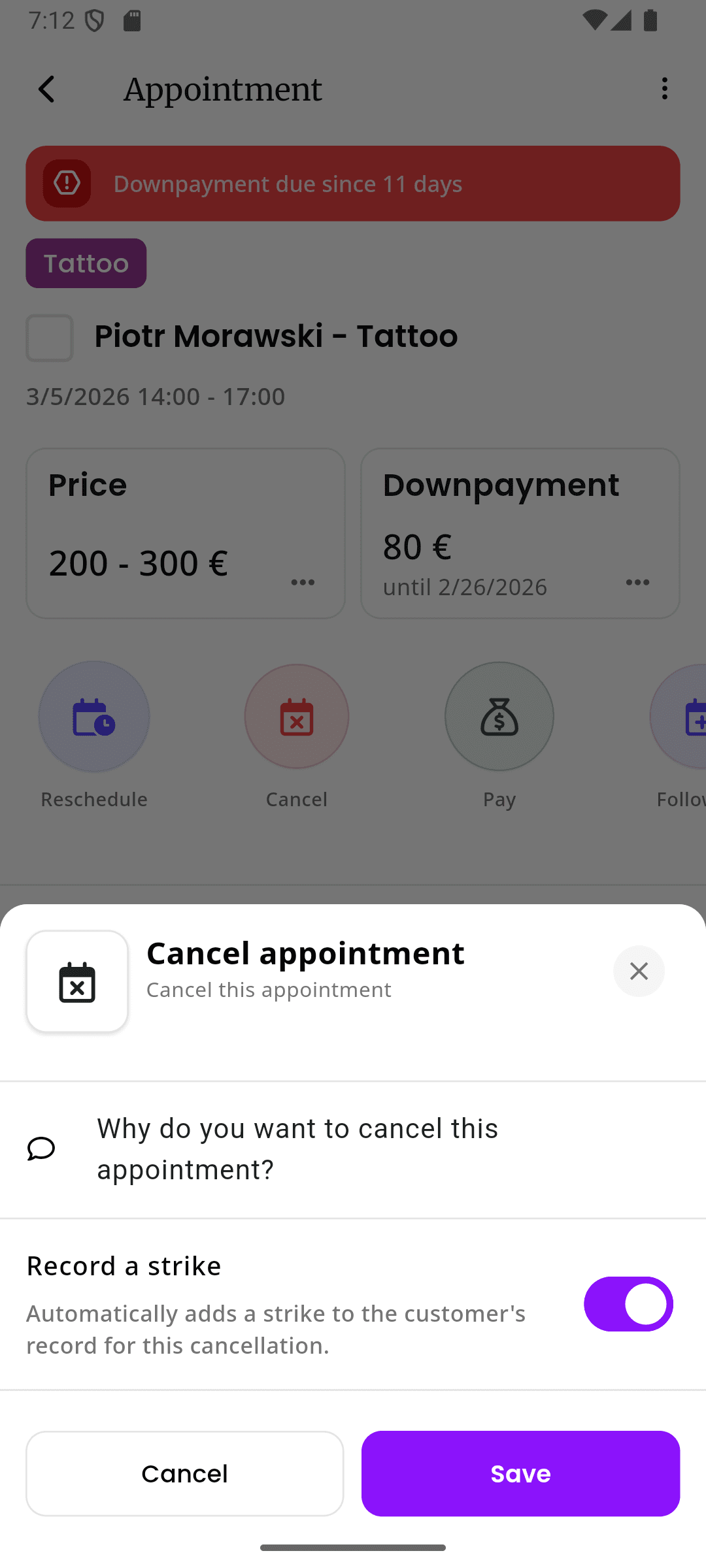
    Set your cancellation window and inkStar enforces it. Cancel too late? The deposit is forfeited. Cancel in time? Full refund. No manual work, no awkward conversations.

    • Custom cancellation windows (24h, 48h, 72h)
    • Self-service cancellation page for clients
    • Override option for special circumstances
    inkStar appointment cancellation screen with policy enforcement
  4. No-Show Tracking

    Every no-show and late cancellation is recorded on the client's profile. You get a full reliability picture so you can make informed decisions about future bookings.

    • Automatic reliability scoring per client
    • Repeat offender alerts on new bookings
    • Option to require higher deposits or block clients
    inkStar create appointment screen showing client reliability history
  5. Calendar Gap Protection

    When a cancellation happens, waitlist clients are notified automatically. Your availability updates in real-time on the booking page so the slot gets filled fast.

    • Automatic waitlist notifications
    • Real-time availability on your booking page
    • Quick-book links for waitlist clients
    inkStar calendar view showing schedule and availability management

See the difference for yourself

Most solutions can't collect deposits at booking time. inkStar integrates deposit collection directly into the booking flow.

  • Deposit at Booking

    No Protection
    Not possible
    Manual Reminders
    Manual bank transfer
    inkStar
    Automatic at booking
  • Automatic Reminders

    No Protection
    None
    Manual Reminders
    Manual texts/calls
    inkStar
    SMS, WhatsApp + Email
  • Cancellation Policy Enforcement

    No Protection
    None
    Manual Reminders
    Verbal agreement only
    inkStar
    Automatic enforcement
  • No-Show Tracking

    No Protection
    Mental notes
    Manual Reminders
    Spreadsheet maybe
    inkStar
    Automatic client profiles
  • Repeat Offender Alerts

    No Protection
    Not possible
    Manual Reminders
    Not possible
    inkStar
    Automatic alerts
  • Client Confirmation

    No Protection
    Hope they show up
    Manual Reminders
    Call to confirm
    inkStar
    One-tap confirmation
  • Self-Service Rescheduling

    No Protection
    Not possible
    Manual Reminders
    Manual back-and-forth
    inkStar
    Client reschedules online
  • Calendar Gap Recovery

    No Protection
    Empty slots stay empty
    Manual Reminders
    Call waitlist manually
    inkStar
    Automatic waitlist notify
  • Setup Time

    No Protection
    None needed
    Manual Reminders
    Ongoing daily effort
    inkStar
    Less than 2 minutes
  • Monthly Time Investment

    No Protection
    0 hours (no protection)
    Manual Reminders
    10-15 hours of calls/texts
    inkStar
    0 hours (fully automatic)

What studio owners say about no-show protection

See how real studio owners eliminated no-shows by collecting deposits at booking time with inkStar.

  • Deposits at booking changed everything. Clients take their appointments seriously now.

    We used to get 4-5 no-shows per week. Since enabling deposit collection on our booking page, we've had maybe 2 in the entire last month. The deposit makes clients think twice before booking casually.

    Marcus Weber
    Owner, Black Ink Studio · Berlin, Germany
  • The booking page deposit flow is so smooth - clients don't even hesitate.

    I was worried clients would resist paying a deposit upfront. But the booking page makes it feel natural - it's just part of the flow. Pay deposit, confirm booking, done. Our booking rate actually increased because clients trust studios that have professional systems in place.

    Elena Popova
    Owner, Velvet Needle Studio · Frankfurt, Germany
  • I finally stopped turning away walk-ins to hold slots for people who never came.

    Before inkStar, my calendar looked full but half the bookings were unreliable. Now every booking has a deposit behind it. The clients who book actually show up, and when someone does cancel, the waitlist fills the gap automatically. My actual revenue went up because I'm serving real clients now.

    Lena Richter
    Owner, Atelier Ink · Cologne, Germany

Frequently asked questions

Everything you need to know about protecting your studio from no-shows with deposits at booking.

When a client books through your online booking page, they're prompted to pay a deposit as part of the booking flow. They select their service, choose a time slot, and pay the deposit - all in one seamless step. The booking is only confirmed after the deposit is paid. You configure the deposit amount (fixed or percentage) per service, and inkStar handles everything else.

No - in fact, studios report that booking rates stay the same or even increase after enabling deposits. Professional clients expect deposits for premium services like tattoos and PMU. The clients you lose are the ones who were most likely to no-show anyway. You're filtering out unreliable bookers while keeping serious clients.

If a client cancels before your cancellation deadline (e.g. 48 hours before the appointment), they receive a full deposit refund automatically. If they cancel after the deadline, the deposit is forfeited according to your cancellation policy. Everything is handled automatically - no manual work needed.

inkStar sends SMS, WhatsApp and/or email reminders at intervals you configure - for example, 1 week before, 48 hours before, and 24 hours before. Each reminder includes a one-tap confirmation link and a reschedule option. If a client doesn't confirm after the final reminder, you're alerted so you can take action.

Yes. You can configure deposit amounts per service - either as a fixed amount (e.g. €50 for a small tattoo) or as a percentage of the total price (e.g. 20% for a large piece). Premium services can require higher deposits, while quick sessions can have smaller or no deposits.

Clients can pay deposits using credit/debit cards, PayPal, and instant bank transfers. The payment flow is integrated directly into the booking page, so clients never leave your booking experience. All payments are processed securely through our PCI-compliant payment system.

Every time a client no-shows, cancels late, or reschedules, it's automatically recorded on their profile. inkStar calculates a reliability score based on their history. When a known no-show client tries to book again, you receive an alert and can require a higher deposit or block them from booking entirely.

Yes. Every reminder includes a reschedule link that lets clients move their appointment to a different time without losing their deposit. This is a key feature - it gives clients an easy alternative to ghosting. Most clients who would have no-showed will reschedule instead when it's this easy.

Still have questions?
Contact Support

Ready to Transform Your Studio?

Start your free trial today and see for yourself how inkStar simplifies your daily workflow.

What you get with your free trial:

  • Full access to all features for 7 days
  • Free data migration assistance
  • Personal onboarding session
  • Dedicated support team
  • 7-day free trial
  • Cancel anytime
  • GDPR compliant
  • Encrypted data at rest & in transit
inkStar

Everything Your Studio Needs

Built by studio owners, for studio owners

  • Works Offline
    Full functionality without internet. Syncs automatically when you're back online.
  • Digital Contracts
    Consent forms, signatures, and medical history. All paperless and legally sound.
  • Integrated Payments
    Card, PayPal, Klarna installments. Automatic deposit collection at booking.
  • Smart Scheduling
    Availability-based slot suggestions. Online booking page for your customers.
Artist Testimonial
inkStar transformed my chaotic studio into a professional business.
Maria Chen
Tattoo Artist, Berlin
No-Show Protection for Tattoo & PMU Studios - Deposits & Reminders | inkStar